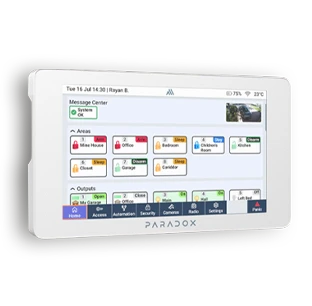
The K70M 7-inch touchscreen keypad is the central control unit for the Paradox M System, allowing you to easily manage your security system, cameras and automations. Its high-resolution touchscreen, Wi-Fi connectivity and built-in battery provide convenient operation, giving you access to all the system’s key functions from a single device.
Thanks to the different colour options, it blends easily into any environment.
Security, cameras, automation, internet radio with external speaker output
Wi-Fi B/G/N connectivity to console
Brilliant, vivid, 1024 x 600 capacitive display
Built-in lithium battery with up to 6 hours of battery life
12 V DC input (minimum 500 mA), two wire connection
Certifications: CE, FCC 15.247
Security is not only about protection, but also about ease of use. With the K70M touchscreen keypad, you can control the key functions of the Paradox system from a single interface, view camera feeds, manage automations, and always stay up to date with the status of your home.
The K70M is the central keypad of the Paradox security system, providing access to the system’s key functions from a single interface. Using the touchscreen, you can easily control the security system, view camera feeds and manage automations.
With the BlueEye app, you can monitor the system status from anywhere, while the K70M keypad provides quick and convenient access to the Paradox system’s functions at home.
Explore the full range of system options and see how multiple devices can be connected to form a single intelligent protection network.